Fair game time for every player.
Fair Go Interchange is an iPhone app for coaches of junior and community sport. Enter your squad, press start, and it tells you who comes on and who comes off, so every kid gets an even go.
- Basketball
- Netball
- Soccer
- AFL
- Touch
- Rugby League
- Rugby Union
- Hockey
- Futsal
- Your own format
How it works
Three tabs, set up in a minute. The app does the maths and the clock watching, so you can watch the game.
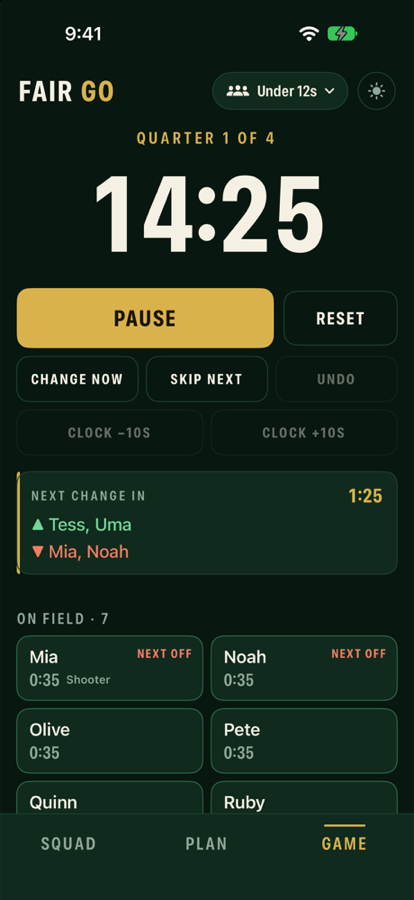
Add your players
Pick your sport (or set your own players on, periods and minutes), type or paste your players' first names, and choose who starts.
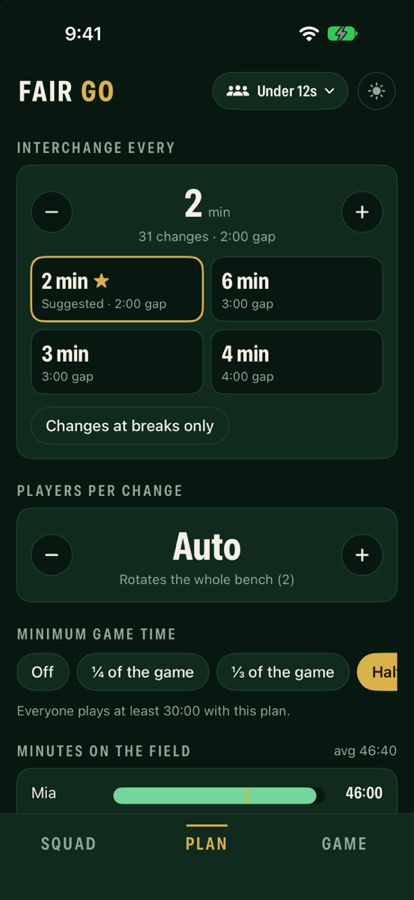
Pick a rotation
The app suggests how often to rotate and shows how even each option is. You see everyone's minutes and the full change schedule before the game.
Press start
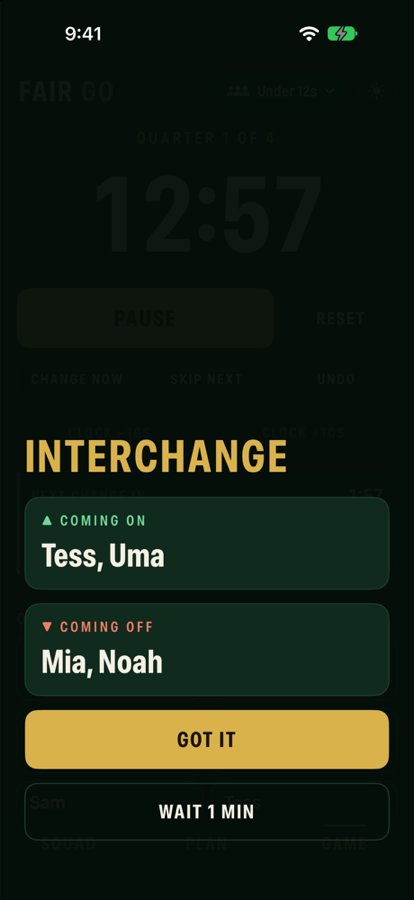
The clock runs, the next change counts down, and at each change you get a buzz and a big coming on / coming off screen.
Made for real game days
Kids get hurt, turn up late, and the ref doesn't wait for you. Fair Go keeps up.
Fair by design
Every change is worked out from actual minutes played, so the plan adjusts itself when things don't go to plan.
Injuries and late arrivals
Mark a player out and the bench player with the fewest minutes goes on. Add them back when they're ready.
Missed a change?
Wait 1 min, change now, skip the next change, or undo. The schedule stays fair.
Goalkeeper locked on
Lock any player on the field. The plan shows honestly what that does to everyone else's minutes.
Like-for-like swaps
Optional positions, so a defender only swaps with a defender.
Minimum game time
Set a rule like "everyone plays at least half" and get a warning if the plan or the game can't meet it.
Lock screen and Apple Watch
See the countdown and who's next on your lock screen, in the Dynamic Island and on your wrist, with a buzz at each change.
Hand over mid-game
Leaving early? Send the game to another parent by AirDrop. They pick up with the same minutes and clock.
Private by default
No account, no internet needed, nothing collected. Names stay on your phone unless you choose to share.
Questions
The things coaches and parents usually ask.
How does it decide who comes off and who goes on?
At each change, the players on the field with the most minutes come off and the players on the bench with the fewest minutes go on. Ties go to whoever has been on (or off) the longest. A player is never swapped for someone who has already played more.
Because it uses actual minutes, not a fixed script, manual swaps, injuries and late arrivals are all taken into account automatically.
How often should I rotate?
The Plan tab suggests the best few intervals for your squad and format and shows how even each one is: "even" means everyone ends within a minute of each other. Pick one or set your own, in half-minute steps up to 5 minutes and whole minutes after that.
You can also choose how many players change at once, or leave it on Auto to rotate the whole bench.
Does it need internet or an account?
No. It works completely offline, so it's fine at grounds with no signal. There's no sign-up and no account.
What happens to my players' names?
They stay on your phone. We don't collect anything and have no servers. Names only leave your phone if you choose to share a squad or hand over a game, and then only to the person you send it to.
The app is built for first names only. See the privacy policy for the details.
Does it work with my phone locked or in my pocket?
Yes. While the clock runs, the countdown and who's next show on your lock screen and in the Dynamic Island, and you get a notification at each change. The screen stays awake while the app is open and the clock is running.
Notification sounds follow your silent switch, so on a noisy sideline turn on haptics, or use the Apple Watch app, which taps your wrist.
What if a player gets injured or turns up late?
Tap the player and choose Mark out. If they were on the field, the bench player with the fewest minutes replaces them straight away. When they're ready, tap Add to play. They join the field if it's short, or the bench if it's full.
I missed the buzzer, or the ref stopped play. What now?
On the change screen, Wait 1 min puts the change off for a minute. You can also Change now, Skip next or Undo the last change, and nudge the clock by 10 seconds while it's paused. Reset asks you to tap twice so it can't happen by accident.
Can I keep my goalkeeper on the whole game?
Yes. Tap Lock on field next to any starter. Locked players never come off. The Plan tab shows what that does to everyone else's minutes, because fewer spots means a bigger gap.
Netball only changes at quarter breaks. Does that work?
Yes. Turn on Changes at breaks only in the Plan tab and changes only happen between periods.
Can it keep positions balanced?
Turn on Swap like for like on the Squad tab and tag players with a position group, such as Shooter, Midcourt and Defender for netball. Changes then only swap players in the same group. Untagged players can swap with anyone.
I have to leave early. Can another parent take over?
Yes. Tap Pause and hand over and send the game by AirDrop, Messages or Mail. The other parent opens it in Fair Go and taps Resume, carrying on with the same minutes and clock. Your phone keeps a read-only copy.
What if the app closes or my phone restarts mid-game?
The game is saved every few seconds. Open the app again and it picks up where it was, working out how much time has passed, with a reminder to check the clock against the ground clock.
Can I coach more than one team?
Yes. Tap the team name at the top to add, switch, rename or delete teams. Each team keeps its own squad, format and game in progress.
Does it keep score?
Only if you want it to. Scoring is off by default, because many junior competitions don't record results. Turn on Keep score in the Plan tab for buttons that match your sport.
Can I share the rotation with parents?
Yes. Share the rotation sheet as an image or text before the game, and the minutes-per-player summary at full time.
What do I need?
An iPhone running iOS 17 or later. The Apple Watch app is optional and needs watchOS 10 or later, with your iPhone nearby.
Support
Questions, problems or ideas? Email fairgointerchange@outlook.com.
Please don't include players' names or other personal details in your email. We don't need them to help.